
How to Track Bills So You Never Miss a Due Date
One list of every bill, a paid checkbox for each month, and a few habits that stop late fees for good. Includes a simple Google Sheets setup.
Efficiency Sheets ·
Late fees are rarely about not having the money. Usually the bill just slipped past. A single list of every bill with a checkbox for each month fixes most of that, and it takes about 20 minutes to set up.
Step 1: Find every bill
Go through your last three months of bank and credit card statements and write down everything that repeats. People usually find a few they'd forgotten.
Then add the bills that come once or twice a year: car registration, renters or home insurance, annual subscriptions, professional fees. Those are the ones that cause surprises.
For each bill, note:
- What it is
- How much it usually costs
- The day of the month it's due
- Whether it's on autopay, and from which account or card
Step 2: Build the tracker in Google Sheets
Make one row per bill and these columns:
| Bill | Amount | Due day | Autopay | Jan | Feb | Mar |
|---|---|---|---|---|---|---|
| Rent | 1,400 | 1 | No | ☑ | ☐ | ☐ |
| Phone | 65 | 12 | Card | ☑ | ☐ | ☐ |
| Car insurance | 118 | 20 | Bank | ☑ | ☐ | ☐ |
Keep going across the top until you reach December.
To add the checkboxes, select the month columns and choose Insert → Checkbox.
Then sort the rows by due day: select the data and use Data → Sort range, sorting by the Due day column. The sheet now reads like a calendar from top to bottom.
Step 3: Add two helpful totals
How many bills are paid this month. If January's checkboxes are in E2 to E20:
=COUNTIF(E2:E20,TRUE)
How much is still due this month. This adds up the amounts of every bill that isn't checked yet:
=SUMIF(E2:E20,FALSE,B2:B20)
Put that second number somewhere you'll see it. It's the money you can't spend yet, even though it's still in your account.
Habits that stop late fees
Check the list on payday. Whenever money comes in, open the tracker, pay whatever falls before your next paycheck, and tick the boxes. That's the habit that does the work.
Move due dates to match your paydays. Many lenders, card companies and utilities will move a due date if you ask. If you're paid on the 1st and 15th, grouping bills right after those dates means the money is always there first.
Still check autopay. Autopay prevents most misses, but not all. A card expires, an account runs low, or a company changes its billing. Ticking the box only after you see the payment go through catches those early.
Save for yearly bills monthly. Divide each yearly bill by 12 and move that amount into savings every month. When the renewal comes, the money is already there.
Add calendar reminders for anything not on autopay. A reminder two days before the due date gives you time to move money if you need to.
When a bill does slip
Call the company right away. If you usually pay on time, many companies will waive a first late fee if you ask. Payments that are only a few days late are often fixable before they reach your credit report, so the sooner you call, the better.
A tracker that's already built
The Bill Payment Tracker in The Premier Bundle has all of this set up: every bill in one place with amounts, due dates and a paid checkbox for each month, plus quarterly tabs that log the date each bill was paid and total each month. The bundle also includes the budget, net worth, habit, workout, meal and travel sheets.
Questions
Should I put every bill on autopay?
Autopay is great for fixed bills that never change, like rent or insurance. For bills that vary, some people prefer to pay by hand so they notice a jump. Either way, check the payment actually went through.
Can I change when a bill is due?
Often, yes. Many credit card companies, lenders and utilities let you pick a new due date if you call or check your account settings. Matching due dates to your paydays makes bills much easier to manage.
How do I keep track of yearly bills?
Add them to your list with their due month, divide the cost by 12, and save that amount every month. When the bill arrives, the money is already set aside.
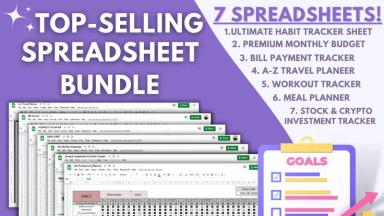
The Premier Bundle: All 7 Sheets
$44.95 · one-time · instant download